Please do not use images created in ToonDoo without having the toondoo watermark, toon title and author name on it because it is a violation and any such material must not be used for elearning or for any other purpose.
Since the e-learning demos I created using Toondoo, violate terms of Toondoo, am withdrawing the e-learning demo from the following post in my site :
I have been looking at some of the training programs that are being offered for aspiring Instructional Designers (ID) in India. I looked at these courses from the perspective of:
An aspiring Instructional Designer who has no clue about Instructional Designing and wants to quickly gain instructional designing skills
An Instructional Designer who has started with Instructional Designing at work, but has lots of queries and needs lots of inputs to improve his/her instructional designing skills
DO YOU THINK?
These courses are really giving the kind of training and information aspiring Instructional Designers need to do their tasks well in their workplace
Aspiring instructional designers will be able to sustain their interest for such a long course duration such as 15 weeks
The training programs for IDs in India are very academic and focus more on instruction design theories
Aspiring IDs or fresh IDs actually retain and use the information they gain from these training programs
There is lot of information overload in these training programs for IDs
In-house training programs for IDs in companies in India are useful
If any of you have actually found any training program on Instructional Designing useful, please share your experiences.
If any of you have ideas on improving training for Instructional Designing in India, please share them.
Please leave your responses in the comments section.
After I posted the game based e-learning demo, a reader sent me a query asking me the tools I used to create the demo, particularly the graphics that is shown in the demo. In response to her query, I write this post.
If you are an instructional designer who does not know graphic design and wants to use quick images in your storyboard or e-learning demos, then the site www.toondoo.com might interest you.
Toondoo is one popular site which people use to create and publish comic strips.
You can also use this site to create custom images for your storyboards and e-learning demos. Please remember you cannot create professional graphics using this site. You cannot use the images created in Toondoo for the e-learning courses that you develop for your clients.
You can use this site to illustrate your instruction design ideas. Instead of creating text based storyboards, you can use colorful images to illustrate your ideas.
Toondoo reminds me of the building set that my dad got when I was a kid. The building set had lot of independent items such as roof top, floor, fence, walls, windows, doors, garden, small characters etc. I used to put the walls, roof, doors and windows together to build a house.
Toondoo works the same way. Toondoo gives you a range of background images, character images and some other miscellaneous images, which you can mix and match and put them together to get the kind of image you want for your e-learning storyboards.
Here are some top reasons why you can use Toondoo for your storyboards and e-learning demos:
Toondoo gives you ready made settings or themes for your courses which otherwise requires graphic design skills.
Here are some examples of background images that you will find in Toondoo:
Toondoo gives you ready made charactersand also allows you to generate custom characters You can use the characters as talking heads for your elearning courses.
Examples of Ready Made Characters in Toondoo
Toondoo allows you to change the emotion and posture of characters.
Here are some examples below:
You can make your courses lively by showing animated characters.
Toondoo gives you a whole range of miscellaneous images. You can combine these images to form something altogether new and something you want for your e-learning.
For example here is a sample image I created by combining a lot of ready made images in Toondoo.
The background image, the tea pot, fruits, teacup and everything that you see in the image above are ready made images that I found in Toondoo. All I did was drag and drop each of the images in the layout area or workspace and arrnaged them in a fashion I want.
Toondoo really helps you create quick images without much editing.
Please remember not use images created in ToonDoo without having the toondoo watermark, toon title and author name on it because it is a violation and any such material must not be used for elearning or for any other purpose.
MS Powerpoint also gives you lots of options to create custom images. You can actually group and ungroup clipart images and then mix and match the images to create a new image altogether.
Check out Tom Kuhlmann’s interesting posts on creating quick images for e-learning to learn more:
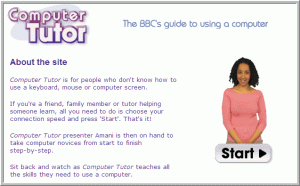
I came across a really interesting course developed by BBC. This course is to help people get started using the Computer as in to get started using the mouse and keyboard.
I liked the way instructional and gaming strategies have been used together in this course.
Click on the image below now to explore the course:
If you play a lot of games, you will definitely be able to identify the standard pattern used.
Every game has a goal and the steps to solve it. The challenge of every game lies in how quickly and efficiently you reach the goal.
In games you can skip things and start with the main activity. It is never mandatory to go through a game in a linear fashion.
For example in games, the introduction can be skipped and also the help section can be skipped. Of course you cannot skip levels in a game because that is the challenge in the game. It sustains interest and motivates the gamer to clear each level to see what comes next J However you can play some levels of a game, exit and then start from the same level where you left.
Using game concepts in learning will definitely engage and interest the learner.
Instead of giving lectures and lessons on a subject, try presenting the subject as a problem or an activity to the learner and allow him to solve the problem or participate in the activity. Learning must happen as the learner tries to solve the problem or indulges in the activity.
I will use the game called Blood Typing for illustration purpose.
Now here are the steps to create a game based e-learning course:
Start with a story/scenario
I have played an umpteen number of games and I have seen that every game starts with a story.
The story may be presented as a dialogue between two people or as a sequence of events with no dialogues or may be just visuals and no text.
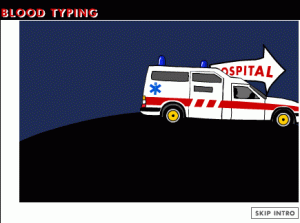
The Blood Typing game begines with visuals of ambulance rushing to a hospital.
End the story with a problem and invite the learner to solve it
In most games the gamer takes over where the story ends, as in he gets to know the background story and then take charge to solve the problem.
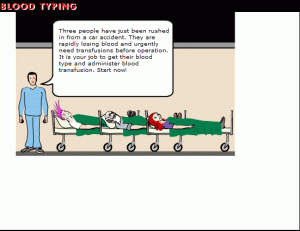
In the Blood Typing game you have a talking head inviting the gamer to get the patient’s blood type and transfuse blood.
Guide the learner
All games help you with the list of controls you use to play the game. Some games have too many controls. There are some other games which require simple mouse clicks.
You can choose how you want the learner to play the game. But make sure that you explain to the learner how he/she has to play the game.
Some games give instructions in the form of written text and some others have a guided tutorial where you play the first level of the game with assistance.
In the Blood Typing game, you have a help section that tells you how to play the game.
Include Incentives and Rewards
Feedback, rewards, incentives motivate gamers to play the game further. I have played many games where you earn points and buy some boosters for the game for the points earned.
In e-learning, rewards will motivate the learner to explore and learn more.
In the Blood Typing game when you correctly transfuse blood, you get words of acknowledgement and encouragement.
Increase the challenge gradually
Every game gets interesting as it proceeds. A game starts at a basic level and proceeds to advanced levels. You master the game as you clear each level.
Coming to e-learning, get the learner started with a basic level activity or problem and increase the difficulty levels as the learner clears each level.
In the Blood Typing game, while treating each patient you have 3 levels of challenge.
Include Trial and Error
If the learner fails to successfully complete a level, he/she must be given another chance or umpteen chances till he/she actually succeeds. If the learner fails at level 2, he should be allowed to play the level again and not start from level 1.
The Blood Typing game allows you to repeat steps to do the blood transfusion right.
Now it is your turn. Have you worked on a game based e-learning course? If so please share your experiences.
Soon after I wrote this post here on the importance of creating a portfolio of elearning demos, I received mails from people saying they understand how important it is to create a portfolio, but then they are just not able to think of any ideas.
I totally agree with them. It just too difficult to cook up a business case. You cannot randomly create an elearning demo. You need a solid business case which will prompt you to think more.
One possibilty to get some ideas is to Google search using the keyword Elearning Design Challenge.
I receive a lot of queries on how to crack interviews for Instructional Designing jobs. If you have good language skills and are creative, you can certainly get a fresh Instructional Designer position in an elearning company.
If you are an experienced Instructional Designer and want to get into a really good job position then in that case only your resume and your aptitude to clear the test conducted by your prospective hirer is not enough.
Apart from your resume and other stuff, a collection of elearning demos and samples would definitely help you make an impression on your prospective hirer.
Just like how graphic designers create portfolio for themselves, experienced Instructional Designers must create one too.
I know there there can be a slight problem here.
Some common reasons why you do not have good elearning demos handy may be as follows:
You cannot share elearning courses or storyboards that you created for a previous company with your prospective hirer
You have not done elearning work though your designation is that of an Instructional Designer
You have never done the kind of elearning work you always wanted to do
You do not want to show your basic level storyboards to your prospective hirer because you think your capability levels are much at higher level
You do not know graphic designing. So you have never been able to create elearning demos or samples
You do not want to create a text based storyboard with just notes to the programmer
Creating a full fledged elearning demo all by yourself without a graphic designer’s help is highly challenging
Apart from this there can be a variety of reason for not having a portfolio of elearning samples.
I just discovered a ready solution to this problem and I am excited in sharing this with you all. If you want to show off the cool instructional strategy that you designed or your completely out of the box interactivity that got rejected but you think is worthy, then just go ahead and exhibit.
All that you need to implement your ideas is get the following:
Any site that allows you to create custom graphics. May be something like Toondoo
You can download the evaluation version of Captivate or Camtasia and just publish your demos in a sharable format such as avi or swf. This is much better than Word based storyboards. Believe me.
I created some demos using Captivate, Toondoo, Snagit and MS Powerpoint.
Please share if you know of any good tools and some good methods to create quick demos.
Creating multiple versions of one and same tutorial with customized content works well. This way you are catering to a variety of target audience requirements. A good example would be the introductory tutorials in the Snagit Learning Centre.
Recently I downloaded the trial version of Snagit 9. Usually I do not pay attention to getting started tutorials in such tools. I mean if I have some problem using a particular feature only then I hunt for some learning material. I have used Captivate and Camtasia and gone through their feature tutorials for help. I usually skip tutorials that are there for introductory purposes.
When you start Snagit 9 for the first time it asks you if you are a first time user or if you have already used Snagit. When you make your choice, a video appears depending on what you choose. If you say you are a new user you get to see a video that gives you a brief overview on how to work with Snagit as in how to capture and edit screenshots. On the other hand if you choose the existing user option you get to see a video that tells you what’s new in Snagit 9.
I guess this is really a cool idea to give customized versions of the same tutorials.
Since I was already familiar with Snagit I was interested in watching the video that told me what is new in Snagit 9. I did not feel the need to see the Introduction to Snagit for New Users video.
Customizing tutorials or learning material helps you make content relevant to the users.
Now watch these two videos on Snagit and check how content has been cutomized:
Please share examples of customized content for learning material, if you have any.
I thoroughly enjoyed playing Home Sweet Home series of games. You can read the summary of the games here.
In this post I share some ideas that could probably improve the instructional value of the game.
Before I proceed below is a snapshot of Ms Green’s kitchen.
If you remember in my previous post I had given an example of a client requirement that is Ms Green’s requirement that her kitchen has greenery. Based on the requirement, I have placed some plants and pots here and there. If you notice there is a design mistake here. I have placed a pot close to the sink and you can also find lots of plants somewhere in the middle of the kitchen. This is a clear mistake. However the game does not mind this mistake. I actually earned full points for this design because I used plants to design the kitchen.
If the game could pin point interior design mistakes and give tips on good interior design, it could be a real value add and there would be some kind of learning here.
So tips related to or concepts of interior design can be given to the gamer in the form of pop up text boxes. This is one thing that can increase the instructional value of the game.
The other thing that the game can give more importance to is the budget.
As I mentioned earlier the game has budget constraints and there is a limit to how many items you can use to design a room or a kitchen. However the numbers do not attract your attention. There is no real challenge in exercing the budget or the item numbers because you know if the client wants a country feel in the living room, you just have to use asian furniture and furnishings. You do not have to bother about the budget because, the moment you exercise your item limit, the game allows you to start building.
The game could probably get the gamers to pay more attention to the budget and the number of items he/she can use. The importance of budget in interior design needs to be highlighted.
The gamer might feel challenged if he/she is asked to design a living room using a low budget, yet make the living room look good. The budget constraint need to be highlighted.
I do not think that not giving tips on interior design or not emphasizing too much on budget is making the game less enjoyable.
These series of games are extremely entertaining as they are.
Yet a value add in such games can do wonders.
Please do play this game and let me know your views.






 One-Stop Resource for Instructional Designing